Both printers land in the same price bracket and appear on the same shortlists, but they are not the same machine. The Elegoo Neptune 4 runs Klipper, the open-source firmware: large bed, fully configurable, community-driven. The Anycubic Kobra 3 is feature-focused: multicolor printing via the ACE Pro system, faster rated top speed, and a closed ecosystem.
The decision hinges on one question: do you want multicolor printing at this price point, or not?
[ QUICK VERDICT ]
Neptune 4 wins on openness and value. Kobra 3 wins if multicolor printing matters.
Pick the Neptune 4 if
You want open source, large community, no multicolor needed
Pick the Kobra 3 if
Multicolor printing is on your list now or soon
Quick Answer
N4
Pick the Elegoo Neptune 4 if you want open-source Klipper firmware, a large 225x225x265mm build volume, strong community support, and do not need multicolor printing. Available for ~$200-260.
K3
Pick the Anycubic Kobra 3 if multicolor printing is on your list now or in the near future, or if you want the highest rated speed (600 mm/s) and largest build footprint (250x250mm) in this price tier. Available for ~$280-299.
--
Pick neither if you want the easiest possible out-of-box experience. Both require more user setup than a Bambu Lab machine. See our best 3D printers under $300 guide for the full comparison including the A1 Mini and Creality V3 KE.
Specs Compared
Spec
Elegoo Neptune 4
Anycubic Kobra 3
Price
~$200-260
~$280-299
Build volume
225x225x265mm
250x250x260mm
Max print speed
500 mm/s
600 mm/s
Motion system
Bed slinger (Cartesian)
Bed slinger
Firmware
Klipper (open source)
Anycubic OS (closed)
Auto bed leveling
121-point auto
LeviQ 3.0 auto
Multicolor
No
Yes, with ACE Pro system
Max nozzle temp
300 C
300 C
Max bed temp
110 C
110 C
Materials
PLA, PETG, TPU, ABS
PLA, PETG, TPU, ABS, HIPS
Connectivity
USB, LAN
USB, Wi-Fi
Screen
4.3-inch touchscreen
4.3-inch touchscreen
Ecosystem
Open source, large community
Closed source, growing community
Specs from manufacturer product pages. Pricing checked several times a week.
The Neptune 4 runs Klipper, giving full access to Input Shaping for speed tuning, pressure advance, and every configuration parameter that open-source firmware provides. The 121-point auto-leveling is thorough. At $200-260 it is one of the best-value Klipper machines available. The FDM printing community around Elegoo and Klipper is large and active.
Best for
+Open-source Klipper: full configuration access
+Tall 265mm Z height: best for tall single-part prints
+LAN connectivity: integrates easily with print farm software
+Lower entry price than the Kobra 3
Falls short on
-No multicolor at any price
-Klipper learning curve: not for buyers who want appliance simplicity
-No Wi-Fi: LAN-only connectivity
-Narrower (225mm) than the Kobra 3 (250mm)
Who the Kobra 3 is Best For
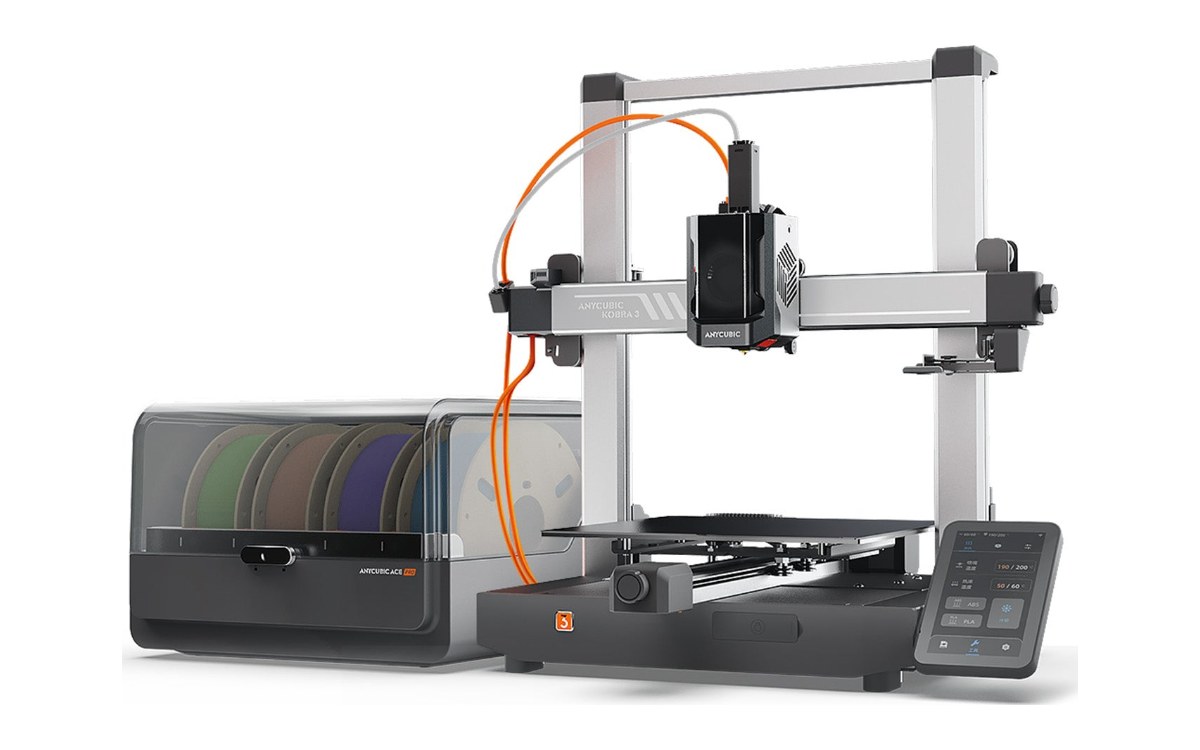
Image: Anycubic
The Kobra 3 supports Anycubic's ACE Pro multicolor system, making it the most accessible path to color printing in this price bracket. Its 250x250mm footprint is wider than the Neptune 4. The 600 mm/s rated top speed is the highest in this comparison, though practical quality speeds for both printers are in the 150-300 mm/s range.
Anycubic has since replaced the Kobra 3 with the Kobra 4. Our Anycubic Kobra 4 Combo review covers what changed, including the ACE 2 Pro with built-in filament drying.
Best for
+Multicolor printing via ACE Pro: the key differentiator
+250x250mm bed: wider than the Neptune 4
+Wi-Fi connectivity built in
+HIPS material support alongside PLA, PETG, TPU, ABS
Falls short on
-Closed ecosystem: fewer tuning resources than Klipper community
-Higher entry price than the Neptune 4
-Multicolor generates waste material on color changes
-Slightly shorter Z (260mm) than the Neptune 4 (265mm)
Frequently Asked Questions
Does the Elegoo Neptune 4 support Klipper?
Yes. The Neptune 4 ships with Klipper pre-installed, which is a significant differentiator at this price. This gives access to Input Shaping, pressure advance, and full parameter control. Source: Elegoo official Neptune 4 product page.
Can the Anycubic Kobra 3 print multiple colors without the ACE Pro?
No. Without the ACE Pro attachment the Kobra 3 prints one color per job. The ACE Pro is what enables multicolor and is either bundled (Combo version) or purchased separately. Source: Anycubic Kobra 3 product page.
Which printer has the bigger build volume?
The Kobra 3 is wider at 250x250mm vs the Neptune 4's 225x225mm. The Neptune 4 is taller at 265mm vs the Kobra 3's 260mm. The Kobra 3 has the larger total build volume overall. Source: manufacturer spec pages.
Which is better for beginners?
Neither is as beginner-friendly as a Bambu Lab machine. Between the two, the Kobra 3's closed-source OS is more approachable than Klipper for someone who does not want to configure firmware. For a wider beginner comparison, see our best 3D printers for beginners guide.
Bottom Line
Open source vs closed. Tall bed vs wide bed. No multicolor vs multicolor-capable. The Neptune 4 and Kobra 3 are genuinely different answers to the same price bracket. If multicolor is the reason you are buying a printer, the Kobra 3 is the answer. If it is not, the Neptune 4 is more machine for less money.
Affiliate disclosure: if you buy through links on this page we may earn a commission at no extra cost to you. We do not own or test the printers on this site. See How We Research.
Specs from Elegoo's and Anycubic's official product pages and spec sheets, and independent comparison sources including mattermanifest.com and zbotic.in, all checked several times a week. No printer on this site has been tested, measured, or owned by the Get 3D Printer team. See How We Research.