
How to Calibrate a 3D Printer, Step by Step
To calibrate a 3D printer, work in this order: check the frame and belts, level the bed and set the Z offset, tune the heaters, calibrate the extruder steps, then tune each filament with a temperature tower, a flow test, pressure advance and a retraction test. Each step depends on the one before, so skipping ahead wastes filament.
This lesson is for filament (FDM) printers. It draws on the OrcaSlicer calibration guide, Ellis' Print Tuning Guide and maker documentation. We don't own or test printers; how we research.
What order should you calibrate a 3D printer in?
Machine first, filament second. The first four steps are about the printer and you rarely repeat them. The last four are about the filament and you repeat them for each new brand or type.
| Step | Fixes | Redo when |
|---|---|---|
| 1. Frame and belts | Layer shifts, wobble, ringing | After moving or rebuilding the printer |
| 2. Bed level and Z offset | First layer not sticking, or squashed | New build plate or nozzle |
| 3. PID heater tune | Temperature swings, banding | New hotend, heater or thermistor |
| 4. Extruder steps | Every print slightly over or under extruded | New extruder or firmware |
| 5. Temperature tower | Stringing, weak layers, poor bridges | New filament brand or type |
| 6. Flow rate | Gaps between lines, rough or bulging tops | New filament brand or type |
| 7. Pressure advance | Bulging corners, thin line ends | New filament or speed profile |
| 8. Retraction | Stringing and blobs | New filament, after steps 5 to 7 |
Do you need to calibrate a new 3D printer?
Usually only part of it. Most new printers ship with tuned firmware and slicer profiles, and many now level the bed for you. The Creality Ender-3 V3 SE, for example, sets its own bed mesh and Z offset with two sensors, so steps 2 and 3 are mostly done. Higher-end machines run fuller self-calibration. No printer knows your filament, though, so steps 5 to 8 still pay off.
The rule: if prints come out clean on the maker's profile, don't fix what works. Calibrate when you see a defect, and start at the earliest step that could cause it.
Step 1: How do you check the frame and belts?
With the printer off, push the print head and the bed by hand. Movement should be smooth with no grinding, and nothing should rock. Belts should twang slightly when plucked, not sag. On printers with wheels, tighten the eccentric nuts until the wheel just stops spinning freely by finger. Then check the gantry is level and the frame bolts are tight. A loose frame causes layer shifts no setting can fix.
Step 2: How do you level the bed and set the Z offset?
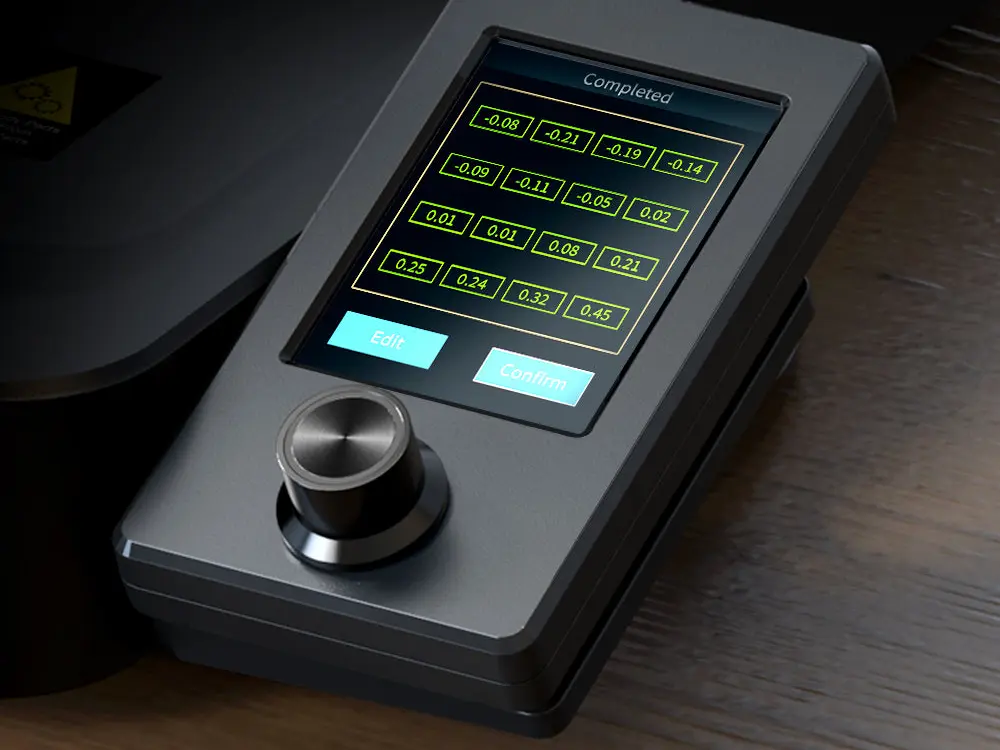
A bed mesh after auto leveling, on the Creality Ender-3 V3 SE screen. Image: Creality
Leveling makes the bed and nozzle parallel; the Z offset sets the gap between them. Run your printer's auto leveling if it has it. On a manual bed, heat the bed and nozzle first, then adjust each corner knob until a sheet of printer paper drags lightly under the nozzle.
Then print a single-layer square and adjust the Z offset live, in small steps of about 0.02 mm. Gaps between lines mean the nozzle is too high. A rough, see-through-thin layer with ridges means it is too low. You want lines that are slightly flattened and fused into a smooth sheet. Ellis' Print Tuning Guide calls this "first layer squish" and has photo examples of each result.
Step 3: How do you PID tune the hotend and bed?
PID tuning teaches the firmware how your heaters respond, so temperatures hold steady instead of swinging. On Marlin firmware, send these from a USB terminal such as OctoPrint or Pronterface:
| Heater | Command | Then save |
|---|---|---|
| Hotend | M303 E0 S210 C8 | M301 with the reported values, then M500 |
| Bed | M303 E-1 S60 C8 | M304 with the reported values, then M500 |
Use the temperature you actually print at. Klipper printers use PID_CALIBRATE instead. Many printers expose this in a screen menu, so check there first.
Step 4: How do you calibrate extruder steps (E-steps)?
E-steps tell the firmware how many motor steps push 1 mm of filament. Get this right once and every later step measures true. Heat the nozzle, mark the filament 120 mm above the extruder entry, extrude 100 mm slowly, then measure what is left.
| Worked example | Value |
|---|---|
Current E-steps (read with M503) | 93.0 |
| Mark distance | 120 mm |
| Left after extruding 100 mm | 23 mm, so 97 mm actually moved |
| New E-steps = 93.0 × 100 ÷ 97 | 95.9 |
| Set and save | M92 E95.9 then M500 |
On Klipper the setting is rotation_distance and the math runs the other way: new value = old value × actual ÷ requested. Repeat the test once to confirm you land within about 1 mm.
Step 5: How do you find the right print temperature?
Print a temperature tower, a column whose temperature drops in 5°C steps, spanning the range printed on the filament's label. OrcaSlicer generates one from its Calibration menu. Pick the coolest section that still has strong layers, clean bridges and no gaps. Hotter improves layer bonding; cooler reduces stringing.
Step 6: How do you calibrate flow rate?
Flow rate (also called extrusion multiplier) fine-tunes how much plastic each filament needs, after E-steps got the machine itself right. OrcaSlicer's flow test prints a set of squares at different flow values; you pick the one with the smoothest top surface and enter it in the filament profile. Its guide recommends a coarse pass then a fine pass.
No Orca? Print a single-wall cube, measure the wall with calipers, and set new flow = old flow × expected width ÷ measured width.
Step 7: What is pressure advance and how do you set it?
Pressure advance (called linear advance in Marlin) compensates for the lag between the extruder pushing and plastic leaving the nozzle. Without it, corners bulge and line ends thin out. OrcaSlicer offers line, pattern and tower tests; print one, pick the value with the sharpest corners and save it to the filament profile. In Marlin it only works if your firmware has linear advance enabled.
Step 8: How do you tune retraction?
Last, because stringing is often a temperature or moisture problem in disguise. Print a retraction tower that steps the retraction length up as it rises, and pick the shortest length with clean travel. Direct drive extruders usually need well under 2 mm; Bowden setups need more. OrcaSlicer's guide notes that a well-tuned printer often needs only 0.2 to 0.4 mm. If stringing survives this, dry the filament.
How do you know calibration worked?
Print a 20 mm calibration cube and measure it. Each side should land within about 0.1 to 0.2 mm, corners should be sharp, the top smooth and the first layer flat. Still seeing a specific defect? Our print quality troubleshooting guide matches symptoms to causes, and the slicer guide covers where these settings live in each slicer.
Calibration FAQ
How often should you calibrate a 3D printer?
Steps 1 to 4 when you set up the printer or change hardware. Steps 5 to 8 for each new filament brand or type. Recheck the Z offset when you change the build plate or nozzle.
Do auto-leveling printers need calibration?
Less of it. Auto leveling handles the bed mesh and, on some printers, the Z offset. It does not tune temperature, flow, pressure advance or retraction for your filament.
What is the difference between E-steps and flow rate?
E-steps is a firmware setting for the extruder hardware, set once. Flow rate is a slicer setting per filament, adjusted on top of correct E-steps.
What is the right order to calibrate a 3D printer?
Frame and belts, bed level and Z offset, PID tuning, extruder steps, then per filament: temperature, flow rate, pressure advance and retraction.
Sources
- OrcaSlicer wiki, Calibration guide
- Ellis' Print Tuning Guide
- Marlin firmware G-code reference (M92, M301, M303, M304, M500, M503)
- Creality, Ender-3 V3 SE product page (bed mesh image)
Researched and written by Ric Ruben.