
Best Multicolor 3D Printer: Five Picks for Five Kinds of Buyer
The best multicolor 3D printer for most people is the Snapmaker U1. Its four separate toolheads waste far less filament than single-nozzle color changers. Pick the Creality K2 Plus Combo for big, heat-resistant parts, the Elegoo Centauri Carbon 2 Combo for an enclosed printer under $400, or our two budget picks, the Anycubic Kobra 4 Combo and the Creality SparkX i7 Color Combo, for four colors at the lowest price.
This is a research roundup, not a hands-on test. We read published testing from Tom's Hardware, PCMag, TechRadar, Notebookcheck, Hackster and HowToMechatronics, checked each official spec sheet, then matched each printer to the buyer it suits. Our method is on the how we research page.
We may earn a commission from links on this page. We do not own or test the printers we write about.
Multicolor printers see some of the biggest Black Friday cuts. Our 3D printer Black Friday deals page tracks them brand by brand.
Which multicolor 3D printer should you buy?
| Printer | Best for | Color system | Build volume | Price now | Regular | Store |
|---|---|---|---|---|---|---|
| Snapmaker U1 | Printing in color every week, with little waste | 4 separate toolheads | 270 mm cube | $699 | $999 | Check current price on Snapmaker |
| Creality K2 Plus Combo | Large parts, ABS and ASA, up to 16 colors | CFS, single nozzle | 350 mm cube | $1,199 | $1,499 | Check current price on Creality |
| Elegoo Centauri Carbon 2 Combo | Enclosed multicolor on a budget | CANVAS, single nozzle | 256 mm cube | $369 | $449 | Check current price on ELEGOO |
| Creality SparkX i7 Color Combo | Four colors, assembled, with TPU in the box | CFS Lite, single nozzle | 260 x 260 x 255 mm | $349 | $399 | Check current price on Creality |
| Anycubic Kobra 4 Combo | Four colors now, up to eight later | ACE 2 Pro, single nozzle | 260 x 260 x 260 mm | $299 | $499 | Check current price on Anycubic |
Prices are checked on each maker's US store several times a week. Every printer we track is on our 3D printer price list.
Why does the color system matter more than the printer?
There are two ways to print in color. A single-nozzle changer, like Creality's CFS, Elegoo's CANVAS or Bambu Lab's AMS, feeds one filament at a time into one hot end. Every color swap means pushing the old color out first, and that purged plastic goes in the bin. A toolchanger like the Snapmaker U1 gives each color its own hot end, so a swap is mostly the printer picking up a different tool.
The gap is big. Tom's Hardware measured about 965 cubic millimeters of purge per swap on the K2 Plus, and 121.7 grams of waste across 206 color changes on one model. HowToMechatronics got 350 grams of waste against 83 grams of finished parts printing three small multicolor objects. On the U1, Tom's Hardware's four-color test print left 0.76 grams of waste.
If you print one color most of the time, purge waste barely matters. If you print colorful figures, signs or gifts every week, it decides your running cost. New to how these machines build parts? Start with our guide to FDM printing.
Is the Snapmaker U1 the best multicolor 3D printer for most people?
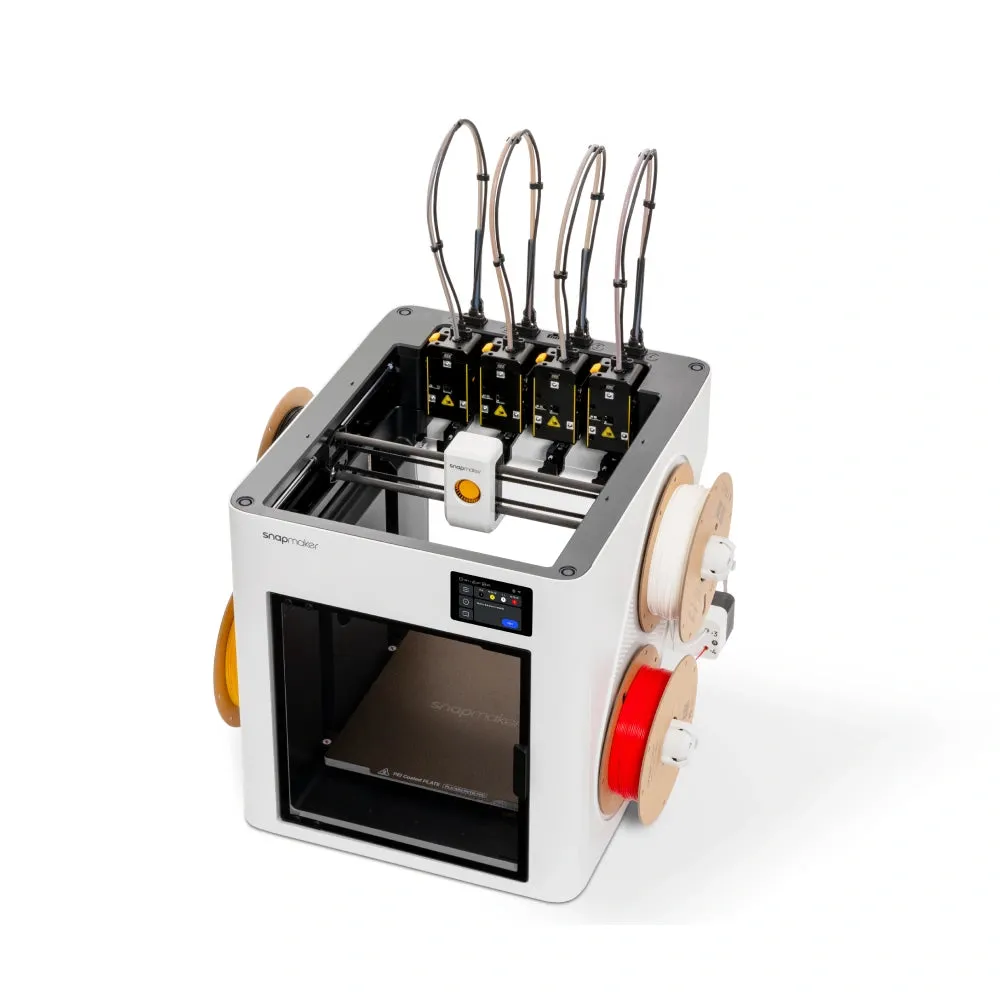
For most buyers, yes. The U1 is a CoreXY printer with four complete toolheads that park at the back of the machine and swap in automatically. Snapmaker quotes 5-second swaps. Independent testing measured 10 to 12 seconds. Build volume is 270 x 270 x 270 mm. PCMag lists it as its Best Mainstream Multicolor 3D Printer, and Tom's Hardware called it the affordable toolchanger people had been waiting for.
Separate toolheads also mean separate materials. PETG with flexible TPU, or PLA with dissolvable PVA supports, works in a single print. Single-nozzle changers handle that badly. Reviewers flag two weak spots: All3DP and Make: both found the plastic body thin, and some early units had tool pick-up failures that firmware updates later addressed.
Buy it if
- You print in two to four colors most weeks.
- You want to mix materials, like PETG and TPU, in one print.
- You want low waste without paying $2,000 or more for a toolchanger.
Skip it if
- You need ABS, ASA or nylon right away. The optional Top Cover enclosure was still on pre-order in late September.
- You need more than four colors in one print.
- You mostly print one color.
All the detail, including materials and owner reports, is in our Snapmaker U1 review.
When is the Creality K2 Plus Combo the better buy?

When size and heat matter more than waste. The K2 Plus is an enclosed CoreXY machine with a 350 x 350 x 350 mm build volume, a chamber heated to 60°C and a 350°C hot end. The Combo adds one CFS, a four-slot changer that reads RFID tags on Creality spools and tracks humidity. Stack four CFS units and you can print 16 colors, the most of any printer here. Tom's Hardware gave it an Editor's Choice, and Creality's own store shows 4.74 out of 5 from 422 owner reviews.
The catch is the purge numbers above. Treat multicolor on this machine as a bonus, not the reason to buy it.
Buy it if
- You print parts bigger than 300 mm.
- You want ABS, ASA or carbon-fiber blends without building an enclosure.
- You print mostly one color, with the odd multicolor job.
- You have bench space for a 35 kg machine.
Skip it if
- Multicolor is most of what you print. The waste adds up every week.
- You only print PLA. You'd be paying for a chamber heater you don't need.
- Your budget stops under $1,000.
Specs, sizes and the K2 versus K2 Pro question are covered in our Creality K2 Plus Combo review. Only printing PLA and PETG on a desk? Our Creality K2 Combo review covers the smaller, cheaper sibling.
What is the best multicolor 3D printer under $500?
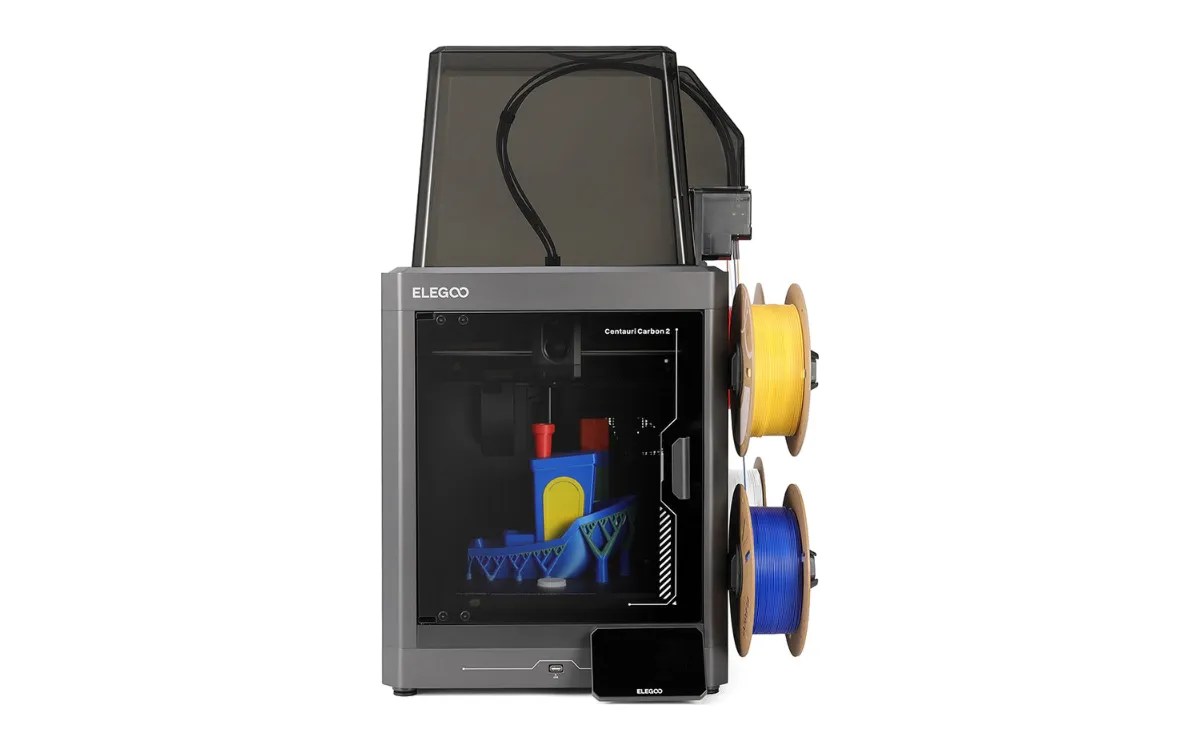
Of the printers we can recommend, the Elegoo Centauri Carbon 2 Combo. It's an enclosed CoreXY printer with a 256 mm cube build volume, a 350°C hardened steel nozzle and the CANVAS four-spool unit. Hackster put its print quality on par with Bambu Lab, TechRadar praised its dimensional accuracy, and Tom's Hardware saw no color bleed on default purge settings.
It has rough edges. Notebookcheck measured color swaps at about 70 seconds each, found time estimates off by more than 17%, and hit unreliable connections between the printer and ElegooSlicer. The spools also sit outside the enclosure, which is a problem in a humid room.
Buy it if
- You want an enclosed multicolor printer and price comes first.
- You want to try ABS, ASA or nylon. The enclosure and 350°C nozzle handle them.
- You'd rather print than tinker. Calibration is automatic.
Skip it if
- You need more than four colors in one print.
- Your printing room is humid.
- Low waste matters most to you. It purges on every swap.
Combo or printer only? We cover that in our Elegoo Centauri Carbon 2 review. If your budget is tighter still, see our best 3D printers under $300.
See the Centauri Carbon 2 Combo
What is the cheapest multicolor 3D printer worth buying?
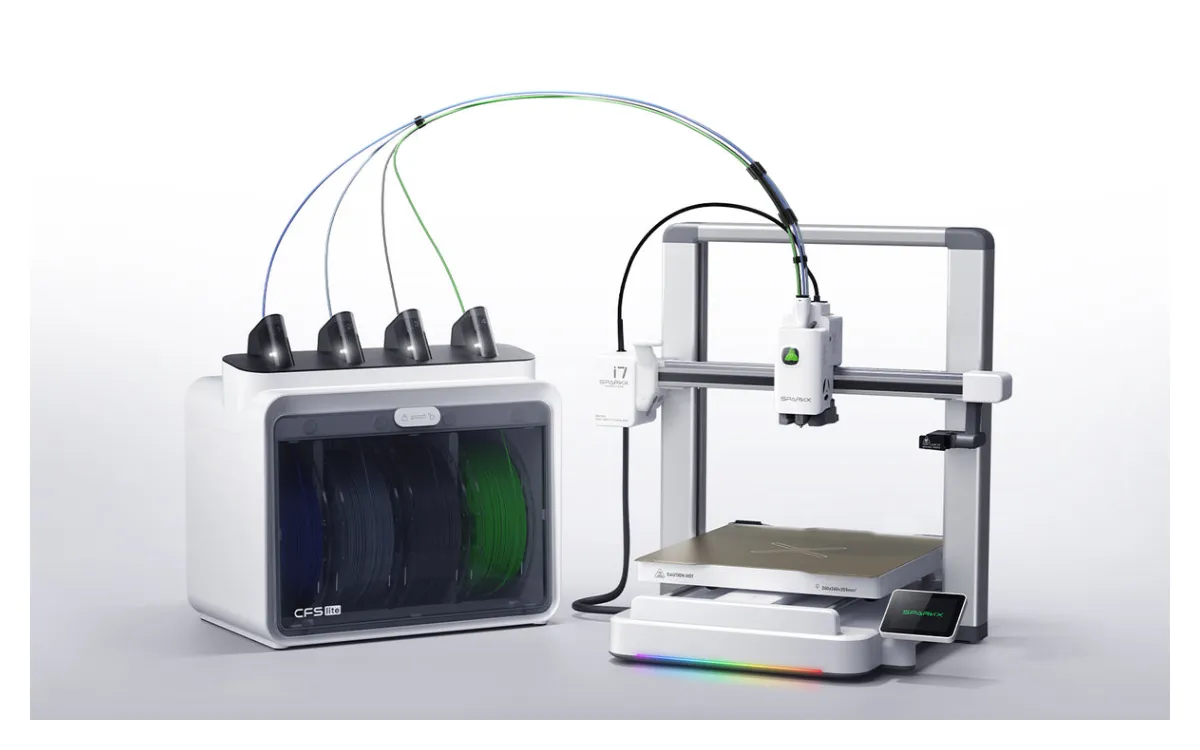
The Creality SparkX i7 Color Combo is one of our two budget picks, at $349 against $299 for the Anycubic Kobra 4 Combo below, which we cover in full in our Anycubic Kobra 4 Combo review. Both go on sale often, so check today's prices in the table above. The i7 Color Combo pairs the open-frame SparkX i7 with the CFS Lite, a four-spool box that keeps filament dry with desiccant, reads the RFID tags on Creality spools and feeds TPU as well as PLA and PETG. Creality says the Color Combo is the only i7 version that ships fully assembled. Tom's Hardware named the i7 the best 3D printer of CES 2026, and Creality's store shows 4.85 out of 5 from 143 owner reviews.
The catch is the same one the Centauri Carbon 2 Combo and the K2 Plus Combo have: one nozzle, so the i7 cuts and purges on every color change. The most common long-term owner complaint, collected by Makers101, is clogging in the stock 0.4 mm nozzle, and Control 3D reported multicolor layer shifts in February 2026. There is no enclosure, and Creality lists PLA, PETG, PLA-CF and TPU, not ABS or ASA.
Buy it if
- You use Creality spools. The CFS Lite reads their RFID tags.
- You want the printer assembled out of the box.
- You want TPU in your color box. The CFS Lite feeds it.
Skip it if
- You need ABS, ASA or nylon. It has no enclosure.
- You print in color every week. Purge waste adds up, so look at the Snapmaker U1.
- Four-color work is the whole point and you can wait for November. The SparkX i8 swaps colors inside its toolhead.
Creality also sells the i7 with the smaller CFS Nano for less. It still prints four colors, but the spools sit in the open, with no drying and no TPU. Our SparkX i8 vs i7 comparison covers both boxes and the four-channel i8 that is still on Indiegogo.
Creality sells every i7 version on one page. Choose the i7 Color Combo option there. If it shows Sold Out, pick the i7 Nano Combo ($299) instead: it still prints four colors, just without the drying box and TPU feed.
When is the Anycubic Kobra 4 Combo the better budget pick?
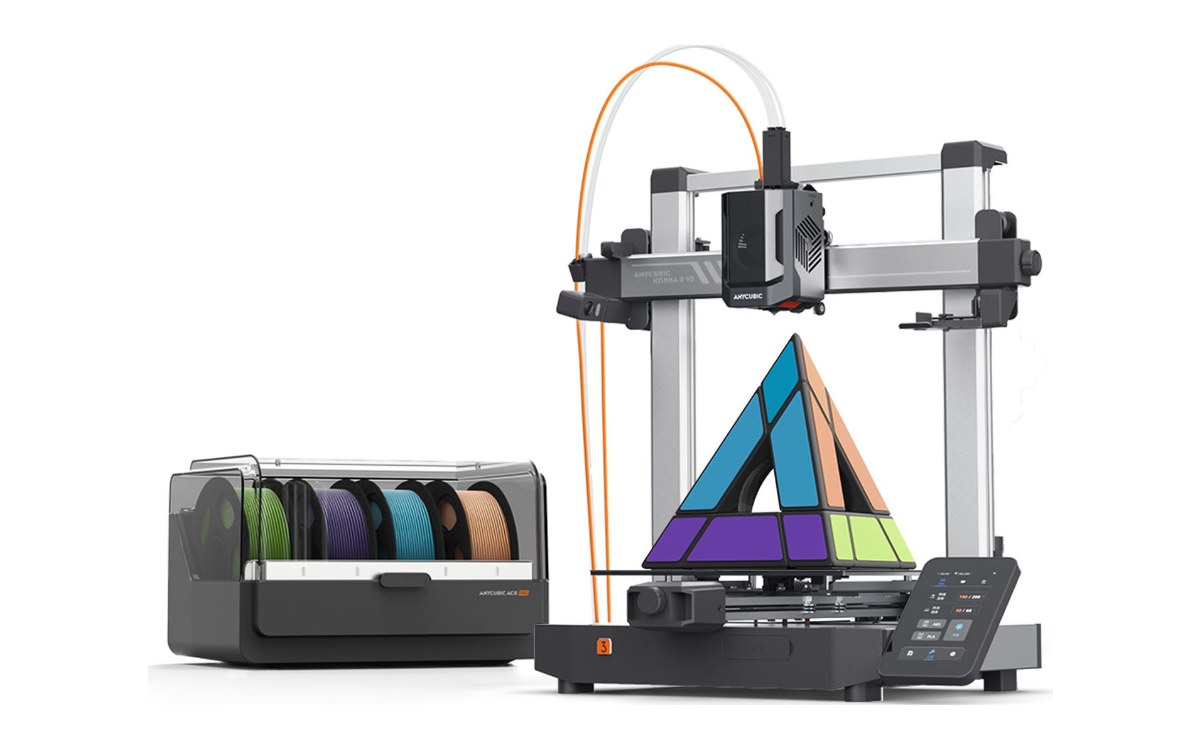
When you want room to grow. The Kobra 4 Combo is an open-frame printer with a 260 x 260 x 260 mm build volume, sold with one ACE 2 Pro, a four-spool box with active filament drying. Add a second ACE 2 Pro and it prints eight colors. Of our picks, only the much bigger K2 Plus Combo goes further. Anycubic quotes a 600 mm/s top speed (300 mm/s by default) and a 300°C nozzle, and a built-in 720p camera with spaghetti detection lets you watch prints from the Anycubic app.
The catch is the one every single-nozzle changer here shares: it cuts and purges on every color change. Anycubic lists PLA, PETG, TPU and ASA among its filaments, but says TPU 95A can't run through the ACE 2 Pro, so soft flexible parts stay single-color.
Buy it if
- You want four colors now and the option of eight later.
- You want the filament box to dry your spools.
- You want to watch prints from your phone. The camera is built in.
Skip it if
- You need ABS, ASA or nylon. It has no enclosure.
- You want soft TPU in multicolor prints. The SparkX i7's CFS Lite feeds it, the ACE 2 Pro won't take TPU 95A.
- You print in color every week. Purge waste adds up, so look at the Snapmaker U1.
We also compare the older Kobra 3 with Elegoo's Neptune 4 in our Neptune 4 vs Kobra 3 comparison.
How do the five compare on specs?
| Spec | Snapmaker U1 | Creality K2 Plus Combo | Elegoo Centauri Carbon 2 Combo | Creality SparkX i7 Color Combo | Anycubic Kobra 4 Combo |
|---|---|---|---|---|---|
| Color change | 4 toolheads, minimal purge | Single nozzle, purges on every swap | Single nozzle, purges on every swap | Single nozzle, purges on every swap | Single nozzle, purges on every swap |
| Max colors | 4 | 4, or 16 with four CFS units | 4 | 4 | 4, or 8 with a second ACE 2 Pro |
| Build volume | 270 x 270 x 270 mm | 350 x 350 x 350 mm | 256 x 256 x 256 mm | 260 x 260 x 255 mm | 260 x 260 x 260 mm |
| Enclosure | Open frame, Top Cover optional | Enclosed, chamber heated to 60°C | Enclosed, HEPA and carbon filter | Open frame, no enclosure | Open frame, no enclosure |
| Max nozzle temp | 300°C | 350°C | 350°C | 300°C | 300°C |
| Top speed | 500 mm/s | 600 mm/s | 500 mm/s | 500 mm/s | 600 mm/s |
| Price now | $699 | $1,199 | $369 | $349 | $299 |
Specs from each maker's official product page. Want to line up other machines? Use our 3D printer comparisons.
What about Bambu Lab and Flashforge?
Bambu Lab's P1S and A1 mini with AMS appear on most multicolor lists. We don't list them as picks here. We only recommend printers we can send you to through a working store link for US buyers, and we don't have that for Bambu Lab yet. When we do, they'll be judged on the same terms. Flashforge is the exception: its four-color AD5X is on our 3D printer price list with a store link, but we have not yet compared it against these five.
What is the best multicolor 3D printer for beginners?
For a first multicolor printer, start with one of our two budget picks: the Creality SparkX i7 Color Combo at $349 or the Anycubic Kobra 4 Combo at $299. Both print four colors from a filament box, and a mistake costs less on a cheaper machine. The SparkX i7 CFS Lite also keeps filament dry and reads the RFID tags on Creality spools, two jobs you would otherwise handle yourself.
If you have never printed before, learn single-color printing first. Our getting started with 3D printing lesson takes a first printer from setup to first print, and the Learn 3D Printing hub covers calibration and filament next.
Our verdict
Buy the Snapmaker U1 if you'll print in color most weeks. Four toolheads cut purge waste to almost nothing and let you mix materials.
Buy the Creality K2 Plus Combo if you print big parts or engineering filaments and want color as an extra.
Buy the Elegoo Centauri Carbon 2 Combo if you want an enclosed multicolor printer on a budget and can live with slow swaps and some software quirks.
Buy the Creality SparkX i7 Color Combo if you want a budget four-color printer that arrives assembled and feeds TPU from its color box.
Buy the Anycubic Kobra 4 Combo if you want a budget four-color printer that can grow to eight colors, with filament drying and a camera built in.
Still deciding whether you need color at all? Our best 3D printers by budget and use covers single-color machines too.
Buying one as a present? Our 3D printer gift guide matches the Kobra 4 Combo, the K2 Combo and four other printers to the people most likely to use them.
Multicolor 3D printer FAQ
Is it worth buying a multicolor 3D printer?
It is if you print colored figures, signs, gifts or multi-material parts often. If you mostly print functional parts in one color, a single-color printer costs less and wastes nothing on swaps. The Elegoo Centauri Carbon 2 is also sold without the CANVAS unit, so you can add color later.
Which multicolor 3D printer has the least waste?
A toolchanger. Of our picks, that's the Snapmaker U1. Tom's Hardware measured 0.76 grams of waste on a four-color test print, and Snapmaker claims up to 85% less filament use than shared-nozzle printers. Single-nozzle systems like the CFS and CANVAS purge on every color change.
Which multi-tool 3D printer is the best?
For most buyers, the Snapmaker U1. It brings a four-toolhead changer down to $699. Other toolchangers, like the Bambu Lab H2C and Prusa XL, cost several times more.
What is the best multicolor 3D printer under $500?
Among the printers we recommend, the Elegoo Centauri Carbon 2 Combo at $369. It adds an enclosure and a 350°C nozzle at that price. Expect color swaps of about 70 seconds and some software quirks. If you only print PLA, PETG and TPU, the Anycubic Kobra 4 Combo ($299) and the Creality SparkX i7 Color Combo ($349) cost less.
What is the cheapest multicolor 3D printer?
Of our five picks, the two cheapest are the Anycubic Kobra 4 Combo ($299, regular $499) and the Creality SparkX i7 Color Combo ($349, regular $399). Both go on sale often. Both print four colors from a box that keeps filament dry; the Kobra can grow to eight colors and the i7 feeds TPU from its box. Both purge on every color change and have no enclosure.
A lot of multicolor printers end up making personalized names, tags and signs to sell. If that is your plan, our 3D printing business guide covers pricing, fees and the design rules that trip up new sellers.
Sources
- Tom's Hardware, Snapmaker U1 review: swap times and the 0.76 g four-color waste test.
- Tom's Hardware, Creality K2 Plus review: purge per swap and the 206-change waste figure.
- HowToMechatronics, Creality K2 Plus review: waste against finished parts on small prints.
- Tom's Hardware, Elegoo Centauri Carbon 2 review.
- TechRadar, Centauri Carbon 2 Combo review.
- Notebookcheck, Centauri Carbon 2 review: swap time, estimate accuracy, slicer connection issues.
- Hackster, Centauri Carbon 2 review.
- PCMag, The Best 3D Printers: Snapmaker U1 as Best Mainstream Multicolor 3D Printer.
- Tom's Hardware, Best Multicolor 3D Printers.
- Anycubic US store, Kobra 4 Combo product page: specs, the ACE 2 Pro and the built-in camera notice.
- Snapmaker, Creality, ELEGOO and Anycubic US store product pages, for specs, prices and stock.
Researched and written by Ric Ruben.